

A blazingly fast PDF table extraction library with python API powered by Rust




- 🚀 Blazingly Fast - Core algorithms written in Rust for maximum performance
- 🐍 Pythonic API - Easy-to-use Python interface with full type hints
- 📄 Edge Detection - Accurate table detection using line and rectangle edge analysis
- 📝 Text Extraction - Extract text content from table cells with configurable settings
- 📤 Multiple Export Formats - Export tables to CSV, Markdown, and HTML
- 🔐 Encrypted PDFs - Support for password-protected PDF documents
- 💾 Memory Efficient - Lazy page loading for handling large PDF files
- 🖥️ Cross-Platform - Works on Windows, Linux, and macOS
This project draws significant inspiration from the table extraction modules of pdfplumber and PyMuPDF. Compared to pdfplumber and PyMuPDF, tablers has the following advantages:
- High Performance: Utilizes Rust for high-performance PDF processing
- More Configurable: Supports customizable table filter settings (
min_rows,min_columns,include_single_cell, e.g., see this issue) - Clean Python Dependencies: No external python dependencies required
Performance comparison of tablers, pymupdf and pdfplumber for PDF table extraction:
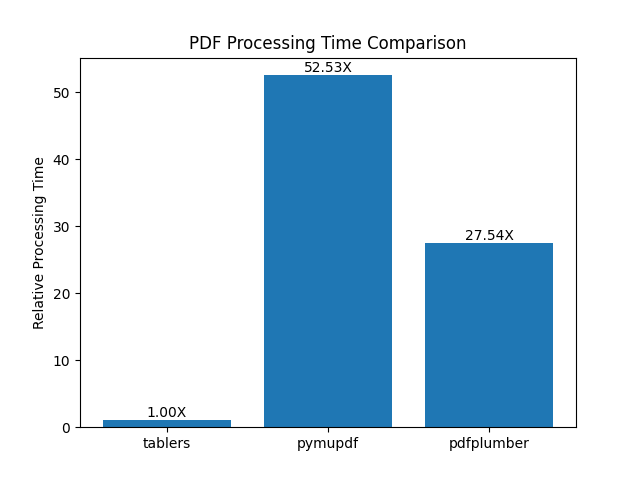
For more details, please refer to the tablers-benchmark repository.
This solution is primarily designed for text-based PDFs and does not support scanned PDFs.
pip install tablersfrom tablers import Document, find_tables
# Open a PDF document
doc = Document("example.pdf")
# Extract tables from each page
for page in doc.pages():
tables = find_tables(page, extract_text=True)
for table in tables:
print(f"Found table with {len(table.cells)} cells")
for cell in table.cells:
print(f" Cell: {cell.text} at {cell.bbox}")
doc.close()from tablers import Document, find_tables
with Document("example.pdf") as doc:
page = doc.get_page(0) # Get first page
tables = find_tables(page, extract_text=True)
for table in tables:
print(f"Table bbox: {table.bbox}")For more advanced usage, please refer to the documents.
- Python >= 3.10
- Supported platforms: Windows (x64), Linux (x64) with glibc >= 2.34, macOS (ARM64)
This project is licensed under the MIT License - see the LICENSE file for details.
- pdfium-render - Rust bindings for PDFium
- PyO3 - Rust bindings for Python