





Quick links: Website • GitHub • Docs • API • ArXiv paper • Demo (video) • Tutorials • Datasets (HF) • Issues
SDialog is an MIT-licensed open-source toolkit for building, simulating, and evaluating LLM-based conversational agents end-to-end. It aims to bridge agent construction → user simulation → dialog generation → evaluation in a single reproducible workflow, so you can generate reliable, controllable dialog systems or data at scale.
It standardizes a Dialog schema and offers persona‑driven multi‑agent simulation with LLMs, composable orchestration, built‑in metrics, and mechanistic interpretability.
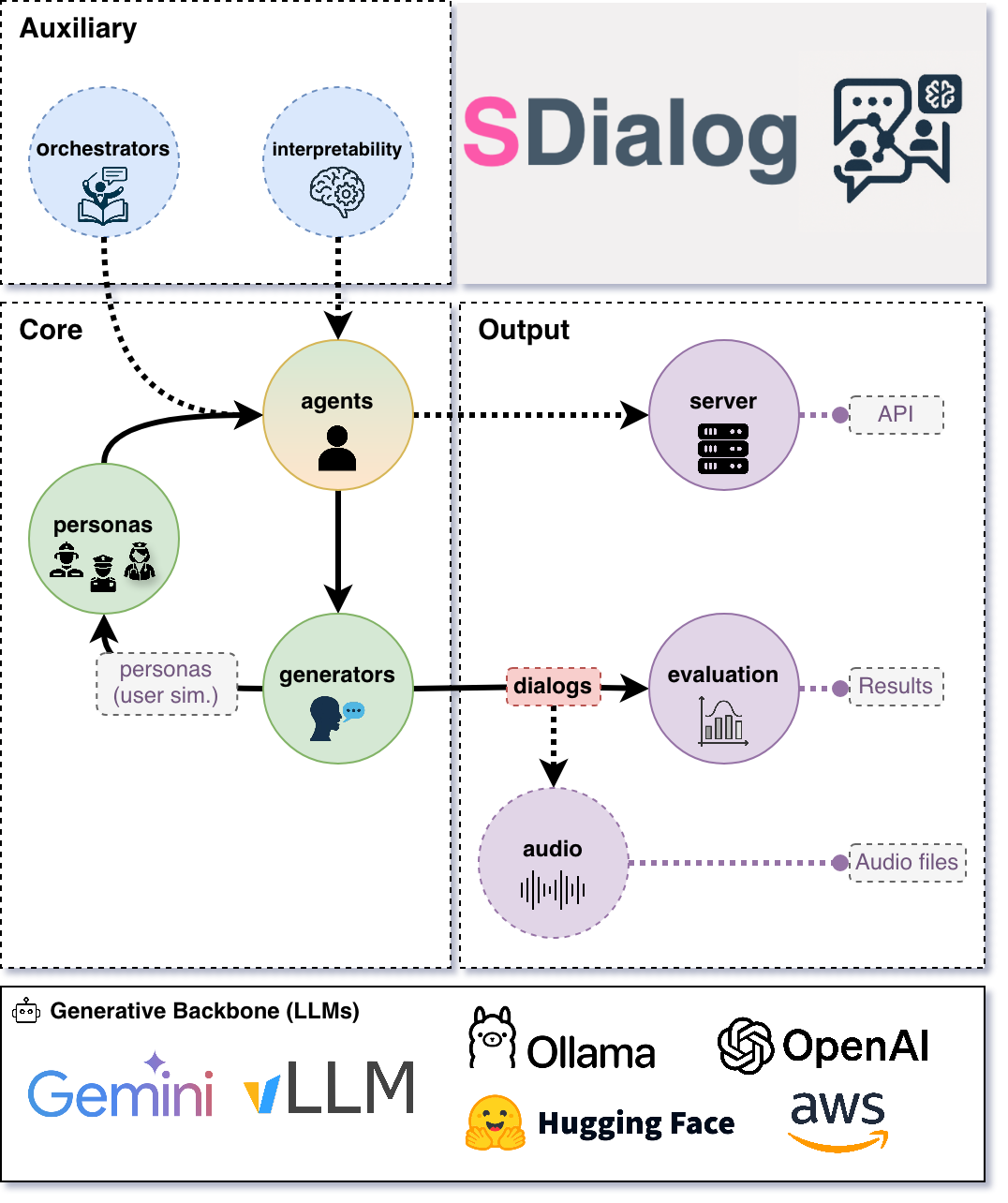
- Standard dialog schema with JSON import/export (aiming to standardize dialog dataset formats with your help 🙏)
- Persona‑driven multi‑agent simulation with contexts, tools, and thoughts
- Composable orchestration for precise control over behavior and flow
- Built‑in evaluation (metrics + LLM‑as‑judge) for comparison and iteration
- Native mechanistic interpretability (inspect and steer activations)
- Easy creation of user-defined components by inheriting from base classes (personas, metrics, orchestrators, etc.)
- Interoperability across OpenAI, Hugging Face, Ollama, AWS Bedrock, Google GenAI, Anthropic, and more.
If you are building conversational systems, benchmarking dialog models, producing synthetic training corpora, simulating diverse users to test or probe conversational systems, or analyzing internal model behavior, SDialog provides an end‑to‑end workflow.
pip install sdialogAlternatively, a ready-to-use Apptainer image (.sif) with SDialog and all dependencies is available on Hugging Face and can be downloaded here.
apptainer exec --nv sdialog.sif python3 -c "import sdialog; print(sdialog.__version__)"Note
This Apptainer image also has the Ollama server preinstalled.
Here's a short, hands‑on example: a support agent helps a customer disputing a double charge. We add a small refund rule and two simple tools, generate three dialogs for evaluation, then serve the agent on port 1333 for Open WebUI or any OpenAI‑compatible client.
import sdialog
from sdialog import Context
from sdialog.agents import Agent
from sdialog.personas import SupportAgent, Customer
from sdialog.orchestrators import SimpleReflexOrchestrator

# First, let's set our preferred default backend:model and parameters
sdialog.config.llm("openai:gpt-4.1", temperature=1, api_key="YOUR_KEY")  # or export OPENAI_API_KEY=YOUR_KEY
# sdialog.config.llm("ollama:qwen3:14b")  # etc.

# Let's define our personas (use built-ins like in this example, or create your own!)
support_persona = SupportAgent(name="Ava", politeness="high", communication_style="friendly")
customer_persona = Customer(name="Riley", issue="double charge", desired_outcome="refund")

# (Optional) Let's define two mock tools (just plain Python functions) for our support agent
def verify_account(user_id):
    """Verify user account by user id."""
    return {"user_id": user_id, "verified": True}
def refund(amount):
    """Process a refund for the given amount."""
    return {"status": "refunded", "amount": amount}

# (Optional) Let's also include a small rule-based orchestrator for our support agent
react_refund = SimpleReflexOrchestrator(
  condition=lambda utt: "refund" in utt.lower(),
  instruction="Follow refund policy; verify account, apologize, refund.",
)

# Now, let's create the agents!
support_agent = Agent(
  persona=support_persona,
  think=True,  # Let's also enable thinking mode
  tools=[verify_account, refund],
  name="Support"
)
simulated_customer = Agent(
  persona=customer_persona,
  first_utterance="Hi!",
  name="Customer"
)

# Since we have one orchestrator, let's attach it to our target agent
support_agent = support_agent | react_refund

# Let's generate 3 dialogs between them! (we can evaluate them later)
# (Optional) Let's also define a concrete conversational context for the agents in these dialogs
web_chat = Context(location="chat", environment="web", circumstances="billing")
for ix in range(3):
  dialog = simulated_customer.dialog_with(support_agent, context=web_chat)  # Generate the dialog
  dialog.to_file(f"dialog_{ix}.json")  # Save it
  dialog.print(all=True)  # And pretty print it with all its events (thoughts, orchestration, etc.)

# Finally, let's serve our support agent to interact with real users (OpenAI-compatible API)
#    Point Open WebUI or any OpenAI-compatible client to: http://localhost:1333
support_agent.serve(port=1333)
Tip
- Choose your LLMs and backends freely.
- Personas and context can be automatically generated (e.g. generate different customer profiles!).
Note
- See "agents with tools and thoughts" tutorial for a more complete example.
- See Serving Agents via REST API for more details on server options.
Probe OpenAI‑compatible deployed systems with controllable simulated users and capture dialogs for evaluation.
You can also use SDialog as a controllable test harness for any OpenAI‑compatible system such as vLLM-based ones by role‑playing realistic or adversarial users against your deployed system:
- Black‑box functional checks (Does the system follow instructions? Handle edge cases?)
- Persona / use‑case coverage (Different goals, emotions, domains)
- Regression testing (Run the same persona batch each release; diff dialogs)
- Safety / robustness probing (Angry, confused, or noisy users)
- Automated evaluation (Pipe generated dialogs directly into evaluators - See Evaluation section below)
Core idea: wrap your system as an Agent using openai: as the prefix of your model name string, talk to it with simulated user Agents, and capture Dialogs you can save, diff, and score.
Below is a minimal example where our simulated customer interacts once with your hypothetical remote endpoint:
# Our remote system (your conversational backend exposing an OpenAI-compatible API)
system = Agent(
  model="openai:your/model",  # Model name exposed by your server
  openai_api_base="http://your-endpoint.com:8000/v1",  # Base URL of the service
  openai_api_key="EMPTY",  # Or a real key if required
  name="System"
)

# Let's make our simulated customer talk with the system
dialog = simulated_customer.dialog_with(system)
dialog.to_file("dialog_0.json")Import, export, and transform dialogs from JSON, text, CSV, or Hugging Face datasets.
Dialogs are rich objects with helper methods (filter, slice, transform, etc.) that can be easily exported and loaded using different methods:
from sdialog import Dialog

# Load from JSON (generated by SDialog using `to_file()`)
dialog = Dialog.from_file("dialog_0.json")

# Load from HuggingFace Hub datasets
dialogs = Dialog.from_huggingface("sdialog/Primock-57")

# Create from plain text files or strings - perfect for converting existing datasets!
dialog_from_txt = Dialog.from_str("""
Alice: Hello there! How are you today?
Bob: I'm doing great, thanks for asking.
Alice: That's wonderful to hear!
""")
# Or, equivalently if the content is in a txt file
dialog_from_txt = Dialog.from_file("conversation.txt")

# Load from CSV files with custom column names
dialog_from_csv = Dialog.from_file("conversation.csv",
                                   csv_speaker_col="speaker",
                                   csv_text_col="value",)

# All Dialog objects have rich manipulation methods
dialog.filter("Alice").rename_speaker("Alice", "Customer").upper().to_file("processed.json")
avg_words_turn = sum(len(turn) for turn in dialog) / len(dialog)
See Dialog section in the documentation for more information.
Score dialogs with built‑in metrics and LLM judges, and compare datasets with aggregators and plots.
Dialogs can be evaluated using the different components available inside the sdialog.evaluation module.
Use built‑in metrics—conversational features, readability, embedding-based, LLM-as-judge, flow-based, functional correctness (30+ metrics across six categories)—or easily create new ones, then aggregate and compare datasets (sets of dialogs) via Comparator.
from sdialog import Dialog
from sdialog.evaluation import LLMJudgeYesNo, ToolSequenceValidator
from sdialog.evaluation import FrequencyEvaluator, Comparator

# Two quick checks: did the agent ask for verification, and did it call tools in order?
judge_verify = LLMJudgeYesNo(
  "Did the support agent try to verify the customer?",
  reason=True,
)
tool_seq = ToolSequenceValidator(["verify_account", "refund"])

comparator = Comparator([
  FrequencyEvaluator(judge_verify, name="Asked for verification"),
  FrequencyEvaluator(tool_seq, name="Correct tool order"),
])

results = comparator({
  "model-A": Dialog.from_folder("output/model-A"),
  "model-B": Dialog.from_folder("output/model-B"),
})
comparator.plot()
Tip
See evaluation tutorial.
Capture per‑token activations and steer models via Inspectors for analysis and interventions.
Attach Inspectors to capture per‑token activations and optionally steer (add/ablate directions) to analyze or intervene in model behavior.
import sdialog
from sdialog.interpretability import Inspector
from sdialog.agents import Agent

sdialog.config.llm("huggingface:meta-llama/Llama-3.2-3B-Instruct")

agent = Agent(name="Bob")
inspector = Inspector(target="model.layers.15")
agent = agent | inspector

agent("How are you?")
agent("Cool!")

# Let's get the last response's first token activation vector!
act = inspector[-1][0].act # [response index][token index]
Steering intervention (subtracting a direction):
import torch
anger_direction = torch.load("anger_direction.pt")  # A direction vector (e.g., PCA / difference-in-mean vector)
agent_steered = agent | inspector - anger_direction  # Ablate the anger direction from the target activations

agent_steered("You are an extremely upset assistant")  # Agent "can't get angry anymore" :)
Tip
See the tutorial on using SDialog to remove the refusal capability from LLaMA 3.2.
Convert text dialogs to audio conversations with speech synthesis, voice assignment, and acoustic simulation.
SDialog can transform text dialogs into audio conversations with a simple one-line command. The audio module supports:
- Text-to-Speech (TTS): Kokoro and HuggingFace models (with planned support for better TTS like IndexTTS and API-based TTS like OpenAI)
- Voice databases: Automatic or manual voice assignment based on persona attributes (age, gender, language)
- Acoustic simulation: Room acoustics simulation for realistic spatial audio
- Microphone simulation: Professional microphones simulation from brands like Shure, Sennheiser, and Sony
- Multiple formats: Export to WAV, MP3, or FLAC with custom sampling rates
- Multi-stage pipeline: Step 1 (tts and concatenate utterances) and Step 2/3 (position based timeline generation and room acoustics)
Generate audio from any dialog easily with just a few lines of code:
Install dependencies (see the documentation for complete setup instructions):
apt-get install sox ffmpeg espeak-ng
pip install sdialog[audio]
Then, simply:
from sdialog import Dialog

dialog = Dialog.from_file("my_dialog.json")

# Convert to audio with default settings (HuggingFace TTS - single speaker)
audio_dialog = dialog.to_audio(perform_room_acoustics=True)
print(audio_dialog.display())

# Or customize the audio generation
audio_dialog = dialog.to_audio(
  perform_room_acoustics=True,
  audio_file_format="mp3",
  re_sampling_rate=16000,
)
print(audio_dialog.display())
Tip
See the Audio Generation documentation for more details. For usage examples including acoustic simulation, room generation, and voice databases, check out the audio tutorials.
- ArXiv paper
- Demo (video)
- Tutorials
- API reference
- Documentation
- Documentation for AI coding assistants like Copilot is also available at
https://sdialog.readthedocs.io/en/latest/llm.txtfollowing the llm.txt specification. In your Copilot chat, simply use:#fetch https://sdialog.readthedocs.io/en/latest/llm.txt Your prompt goes here...(e.g. Write a python script using sdialog to have an agent for criminal investigation, define its persona, tools, orchestration...)
To accelerate open, rigorous, and reproducible conversational AI research, SDialog invites the community to collaborate and help shape the future of open dialog generation.
- 🗂️ Dataset Standardization: Help convert existing dialog datasets to SDialog format. Currently, each dataset stores dialogs in different formats, making cross-dataset analysis and model evaluation challenging. Converted datasets are made available as Hugging Face datasets in the SDialog organization for easy access and integration.
- 🔧 Component Development: Create new personas, orchestrators, evaluators, generators, or backend integrations
- 📊 Evaluation & Benchmarks: Design new metrics, evaluation frameworks, or comparative studies
- 🧠 Interpretability Research: Develop new analysis tools, steering methods, or mechanistic insights
- 📖 Documentation & Tutorials: Improve guides, add examples, or create educational content
- 🐛 Issues & Discussions: Report bugs, request features, or share research ideas and use cases
Note
Example: Check out Primock-57, a sample dataset already available in SDialog format on Hugging Face.
If you have a dialog dataset you'd like to convert to SDialog format, need help with the conversion process, or want to contribute in any other way, please open an issue or reach out to us. We're happy to help and collaborate!
See CONTRIBUTING.md. We welcome issues, feature requests, and pull requests. If you want to contribute to the project, please open an issue or submit a PR, and help us make SDialog better 👍. If you find SDialog useful, please consider starring ⭐ the GitHub repository to support the project and increase its visibility 😄.
This project follows the all-contributors specification. All-contributors list:
 Sergio Burdisso 💻 🤔 📖 ✅ |
 Labrak Yanis 💻 🤔 |
 Séverin 💻 🤔 ✅ |
 Ricard Marxer 💻 🤔 |
 Thomas Schaaf 🤔 💻 |
 David Liu 💻 |
 ahassoo1 🤔 💻 |
 Pawel Cyrta 💻 🤔 |
 ABCDEFGHIJKL 💻 |
 Fernando Leon Franco 💻 🤔 |
 Esaú Villatoro-Tello, Ph. D. 🤔 📖 |
If you use SDialog in academic work, please consider citing our paper:
@misc{burdisso2025sdialogpythontoolkitendtoend,
  title         = {SDialog: A Python Toolkit for End-to-End Agent Building, User Simulation, Dialog Generation, and Evaluation},
  author        = {Sergio Burdisso and Séverin Baroudi and Yanis Labrak and David Grunert and Pawel Cyrta and Yiyang Chen and Srikanth Madikeri and Esaú Villatoro-Tello and Thomas Schaaf and Ricard Marxer and Petr Motlicek},
  year          = {2025},
  eprint        = {2506.10622},
  archivePrefix = {arXiv},
  primaryClass  = {cs.AI},
  url           = {https://arxiv.org/abs/2506.10622},
}
(A system demonstration version of the paper has been submitted to EACL 2026 and is under review; we will update this BibTeX if accepted)
This work was mainly supported by the European Union Horizon 2020 project ELOQUENCE and received a significant development boost during the Johns Hopkins University JSALT 2025 workshop, as part of the "Play your Part" research group. We thank all contributors and the open-source community for their valuable feedback and contributions.
MIT License
Copyright (c) 2025 Idiap Research Institute