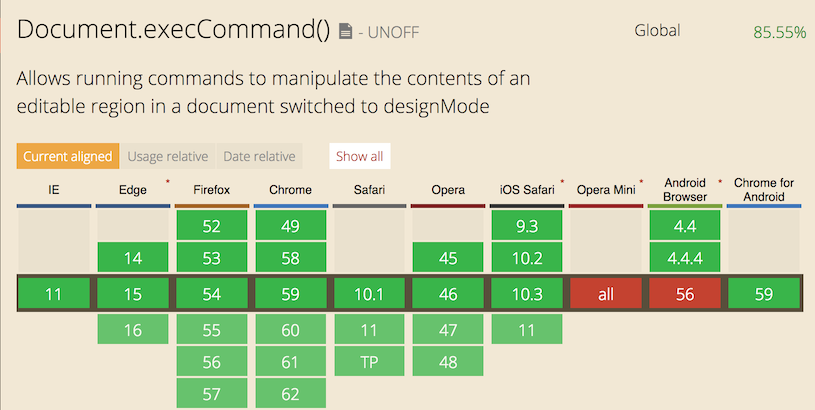
Check them out.
npm install --save v-clipboardyarn add v-clipboardimport Vue from 'vue'
import Clipboard from 'v-clipboard'
Vue.use(Clipboard)When an element that contains v-clipboard directive is clicked, the value of value will be copied into clipboard.
Copying static value (directive should receive actual value):
<button v-clipboard="value">
  Copy to clipboard
</button><button v-clipboard="'some text'">
Copy to clipboard
</button>Copying dynamic value (directive should recieve a function that returns value):
<button v-clipboard="() => value">
  Copy to clipboard
</button>
Copying anything in your methods:
this.$clipboard(value)Without plugin:
import { Clipboard } from 'v-clipboard'

await Clipboard.copy(value)<button
v-clipboard="foo"
v-clipboard:success="clipboardSuccessHandler"
v-clipboard:error="clipboardErrorHandler"
>
Copy to clipboard
</button>{
methods: {
clipboardSuccessHandler (value, event) {
console.log('success', value)
},
clipboardErrorHandler (value, event) {
console.log('error', value)
}
}
}copy / $clipboard is an async call. Firstly, library makes an attempt to update clibpoard using execCommand, if that operation is unsuccessful it makes an attemnt to use Navigator Clipboard API and automatically requests access, waits for access to be granted, then writes to clipboard.
https://codesandbox.io/s/epic-waterfall-17yet5?file=/src/App.vue