
The Page Builder allows creating ecommerce pages from blocks and editing them using a visual editor.
Each page consists of several different blocks. The block view and settings depend on web page requirements.
The page is created in the builder as a list of blocks with specific settings applied to each block. All data are saved in a Json file format.
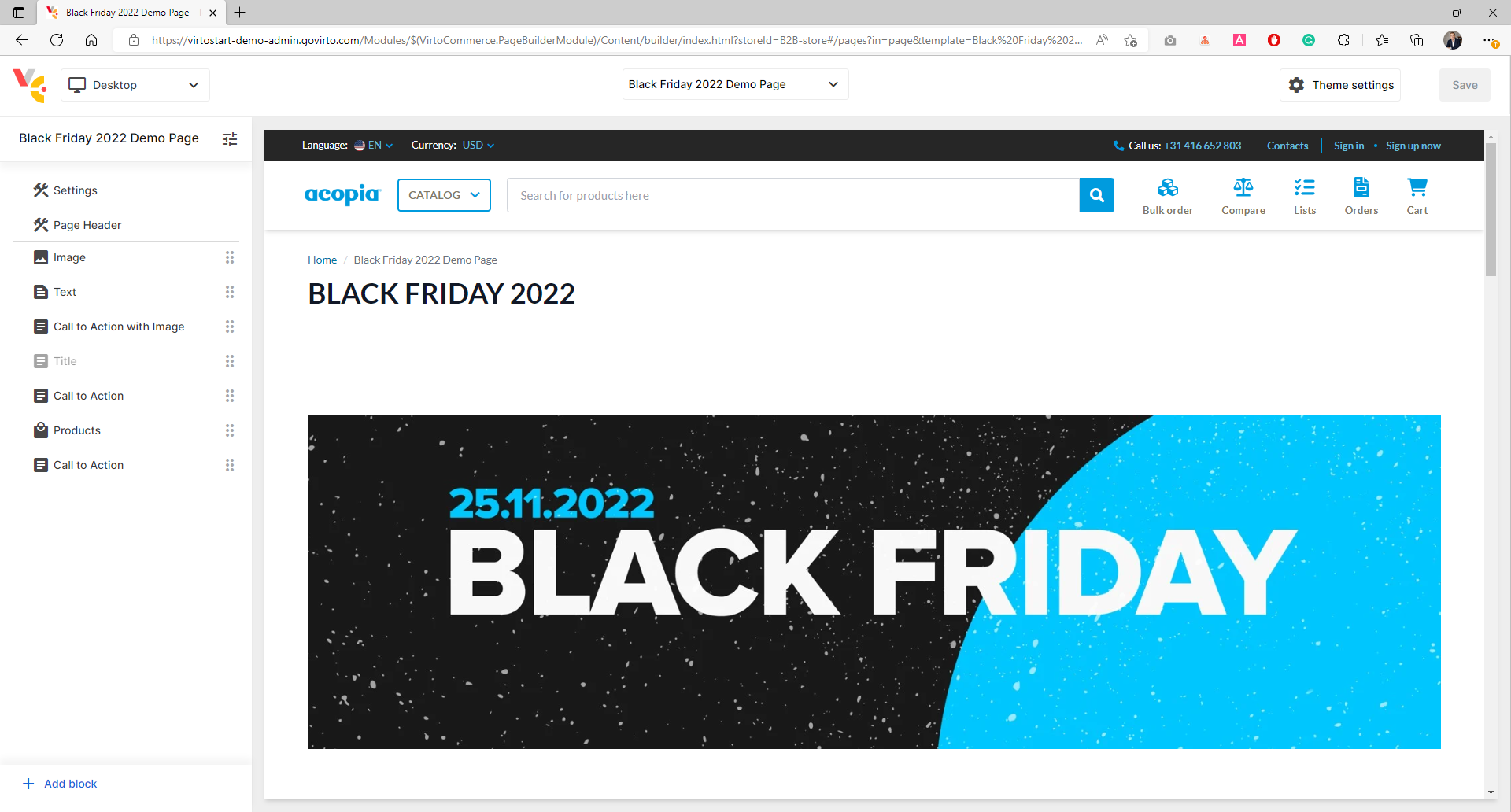
- Build e-commerce landing pages – simple and faster.
- Look at the content as the end customer see it.
- Mobile-friendliness by design.
- Ready-to-go building blocks and recommendations.
- Integrable into your unique design.
- Configurable set of favourites blocks.
- More blocks. Less code. Create new blocks with flexible JSON schema.
- Can be integrated with your existing sites and apps.
- Ready for integration with DevOps.
- Ready for Publishing process.
- Build a new landing page visually without developer.
- Theme editor.
- Ecommerce page customization (Preview).
- Preview content.
- Block library.
- Seo by design.
- Mobile-friendliness by design
- Block management with Drag and drop, Copy, Paste, Hide, etc.
- Integration with Virto Frontend.
- Native Extensibility Framework.
- Permissions.
- Virto Commerce (
vc-platform) Quick start - Virto Frontend (
vc-frontend). Deploy Frontend - Page Builder Module (
vc-module-pagebuilder). Download and Install.
Check that Virto Commerce Platform and Storefront use same Shared Content folder.
Content configuration should be extended with PathMappings section.
appsettings.json
    "Content": {
        ...
        "PathMappings":{
            "pages": [
                "Themes",
                "_storeId",
                "_theme",
                "content/pages",
            ],
            "themes": [
                "Themes",
                "_storeId"
            ]
        }
        ...
    },
Environment Variables
      Content__PathMappings__pages__0: "Themes"
      Content__PathMappings__pages__1: "_storeId"
      Content__PathMappings__pages__2: "_theme"
      Content__PathMappings__pages__3: "content/pages"
      Content__PathMappings__themes__0: "Themes"
Content__PathMappings__themes__1: "_storeId"Public Store URL should be configured.

- Open Virto Commerce Admin UI.
- Select
Stores. - Select Current Store.
- Setup Store URL if it's empty
- Click Save button to apply.
You can purge static page from storefront cache by event. Otherwise, you will need to wait for cache expiration.
Virto Storefront has /storefrontapi/content/reset-cache end point for static page invalidation.
We recommend using Webhooks module.
- Install
vc-module-webhooksmodule. - Open Virto Commerce Admin UI.
- Select Webhooks module.
- Click
Addbutton in toolbar to create a new webhook subscription. - Enter webhook subscription name.
- Select
Page Builder Content Changed Eventevent in Events drop-down. - Select
PathandTypein additional fields. - Turn on
Activatecheckbox. - Enter Storefront end point in URL. Ex: https://www.mypublic-domain.com//storefrontapi/content/reset-cache
- Save webhook subscription.
!!note: change image to correct (event name was changed)

- Open Virto Commerce Admin UI.
- Select Content module.
- Find Store and Select Pages widget.
- Click
Addbutton in toolbar. - Select 'Design page'.
- Provide page file name, public name and permalink. Ex: 'black-friday-2022', 'Black Friday 2022' and
blackfriday-2022. - Click
Createbutton
Now, you should be redirected to page builder application and you can create a first page.
Later, you can open and edit page builder pages, directly from content module.
Page Builder reads meta-data from theme. Developers can extend or customize page builder behaviour by theme repository.
├── client-app                    // The main folder for the application.
|   ├── shared                    // Assets needed to be precompiled during building.
|   |   └── static-content
|   |      └── components         // Vue Components for rendering Page Builder elements.
├── config
|   |   └── schemas               // All Page Builder meta information are stored here.
|   |      ├── blocks             // Block definitions.
|   |      |   └──...
|   |      ├── objects            // Object definitions.
|   |      |   └──...
|   |      ├── sections           // Sections definitions.
|   |      |   └──...
|   |      ├── shared             // Global settings folder.
|   |      |   └── _blocks.json   // Global settings for blocks.
|   |      |   └── _sections.json // Global settings for sections.
|   |      └── templates
|   |          └── page.json      // Page Builder configuration for static pages.
|   └── settings_schema.json      // Theme settings schema file. Page Builder uses it for Theme and Preset editor.
|   └── settings_data.json        // Theme config file.
To enable the preview of your site within the Page Builder application, the site must allow itself to be displayed in an iframe. This can be achieved by setting the appropriate headers in your server configuration.
Add the following headers to your server configuration:
Content-Security-Policy: "frame-ancestors 'self' https://localhost:5001;"
Cross-Origin-Resource-Policy: "cross-origin"
Cross-Origin-Embedder-Policy: "credentialless"
These headers ensure that the site can be embedded in an iframe and handle cross-origin requests appropriately.
Copyright (c) Virto Solutions LTD. All rights reserved.
Licensed under the Virto Commerce Open Software License (the "License"); you may not use this file except in compliance with the License. You may obtain a copy of the License at
http://virtocommerce.com/opensourcelicense
Unless required by applicable law or agreed to in writing, software distributed under the License is distributed on an "AS IS" BASIS, WITHOUT WARRANTIES OR CONDITIONS OF ANY KIND, either express or implied.