I intend to Implement a real-time Face detection and tracking the head poses position from high definition video using Haar Classifier through Raspberry Pi. SimpleCV and OpenCV libraries are used for face detection and tracking the head poses position. The experimental result computed by using computer vision SimpleCV and OpenCV framework libraries along with above mentioned hardware results were obtained through of 30 fps under 1080p resolutions for higher accuracy and speediness for face detection and tracking the head poses position.
Things needed:
A raspberry pi -- Model A will work fine, I have the original Model B which has the same specs as the new Model A (minus network). A pan/tilt bracket Two Servos A Pi-Supported Webcam (any usb Webcam will work)
Make sure you are using the Official RaspbianOS and that it is up to date. You may want to overclock your raspberry pi. The higher you go the faster the facial recognition will be, but the less stable your pi may be.
STEPS : 1.Install OpenCV for python: sudo apt-get install python-opencv 2.Get the servoblaster servo driver for the raspberry pi.
You can download all the files as a zip archive and extract them to a folder somewhere on the pi.
To install the servo blaster driver open a terminal and CD into the directory where you extracted the servoblaster files
run the command: sudo make install_autostart
or just: sudo make install
(you can check the command by opening Makefile in the kernel)

start servoblaster with the following command: sudo modprobe servoblaster
Now its time to get started. Put Together Your Rig: Build the pan/tilt brackets as per the instructions and attach the servos. Attach your camera to the top of the bracket and plug it into your raspberry pi usb port. I was able to power it without a usb hub, but you may want to get a powered usb hub and go through that.
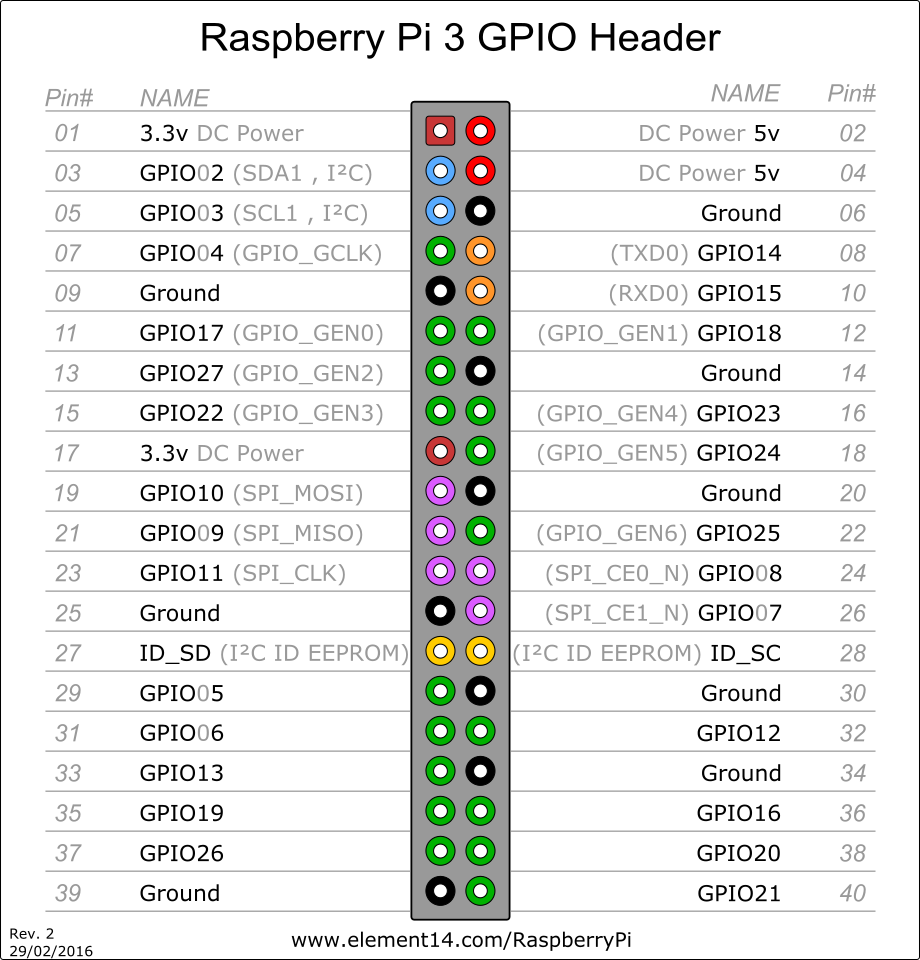
Servoblaster considers servo-0 to be whatever is connected to GPIO 4 and servo-1 is whatever is connected to GPIO-17.
Servos have three wires, one is red which is Vin/positive, one is brown or black which is ground/negative and the other is control.
using the ribbon cable (and in my case some connector wire jammed into the holes) connect the control wire for each servo to the correct pin. The code assumes that servo-0 will control the left-right movement and servo-1 will control the up-down movement of the camera; so connect them this way.
Run the Program
I have attached the python script to this article, it's called PiFace.py to run it just CD to it's location in terminal and type: python PiFace.py