Can't see the embed? Click here to watch on YouTube
This Video was made by HyIsNoob, but as it has nearly the same stuff as this mod, I just used his!
This is a fork of the Orbital Railgun mod by Mishkis that adds sounds and other useful features!
| Version | Status |
|---|---|
| 1.20 - 1.20.1 | ✅ Supported |
| 1.20.2 | ✅ Supported |
| 1.20.3 - 1.20.4 | ✅ Supported |
| 1.20.6 | ✅ Supported |
An unofficial Forge version can be found here.
If you've ever wanted to destroy large swathes of land in an instant while having no regard for the local fauna and wildlife present, then our new invention of the Orbital Railgun may interest you. By harnessing the power of a star, you are able to communicate directly to our rapid-response railgun satellite, allowing for quick and easy access to absolute destruction. Simply aim your Orbital Railgun and fire, and within half a minute you will have caused an ecological disaster, but at least the area is clear now!
Note: it WILL destroy bedrock.
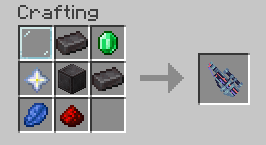
Once you've crafted the Orbital Railgun, hold right click to aim and then left click to fire.
Access the config screen through Mod Menu (if installed) to customize:
- Volume Settings: Adjust the volume for each sound (scope, shoot, equip) from 0.0 to 1.0
- Enable/Disable Sounds: Toggle individual sound effects on or off
Configuration is stored in config/orbital-railgun-enhanced.json5 in your Minecraft directory.
- Download the correct JAR for your Minecraft version from Releases
- Place the JAR file in your
modsfolder - Make sure all required dependencies are also installed
- Launch Minecraft with the Fabric Loader profile
Note: This mod includes server and client functionality. Server-side installation is required if not in Singleplayer!
If you found any issues/bugs or have some ideas for this mod, head to the issue tracker and create a new issue.
We also welcome code contributions! Please see our Contributing Guide for more information on how to contribute.
- Original mod: Orbital Railgun by Mishkis
- Owner of this Mod: KingIronMan2011
- SFX Maker: HyIsNoob
- Source code license: MIT (see LICENSE)