






showoff-dots.mp4
Caution
This is not purely written in Nix-Language. You should check ZaneyOS. Link below
Important
The install scripts assumes a clean installation of NixOS or the understanding that it will replace any existing configuration It will not merge into an existing NixOS configuration. You can use this code at your on your own risk.
Currently, this project is on the unstable nixpkgs channel. When 25.11 becomes the new stable branch, the plan it to stay there, then move to the next stable
-
Being on the unstable channel is a bigger challenge to support. An update can't prevent a rebuild, or require updating nix settings.
-
Make sure to read Hyprland's WIKI
-
** This Repo does not contain Hyprland configuration files. (Dotfiles)! **
- You can either, use Jak's, create your own configuration, or try to use another project's config.
- Make sure you have all the requirements first. I.e. fonts, supporting packages, at the correct version
-
This new release adds Home Manger, but only manages a small set of packages
- NeoVim via NIXVIM
- Ghostty
- bat
- bottom
- btop
- eza
- fzf
- git
- tealdir
- yazi
** Not all of the configuration files in this project are written in NIX language **
- The
auto-install.shscript will install Hyprland config files, (Dotfiles) fromKooL's Hyprland-Dots - These Hyprland dotfiles are constantly evolving / improving
- You can check the CHANGELOG here
Hyprland-Dots-Changelogs - GTK Themes and Icons will be pulled from
LINK, including Bibata Cursor Modern Ice - You will be prompted if you want to download wallpapers from here:
REPO
[Note:] The wallpapers contain AI generated and AI enhanced images. If this is an issue for you enter "N" when prompted to download them
> [!IMPORTANT] > Take note of the requirements >
👋 👋 👋 Requirements
- You must be running on NixOS 24.11+
- 25.05+ recommended
- BARE minimum space required is 64GB. 128GB+ is recommended as NixOS is a space-hungry distro
- Must have installed NIXOS using **GPT partition ** & Boot UEFI
/bootmust be at least 1GB. (Some are now recommending 2GB b/c of firmware size increases)- Systemd-boot is configured as the default bootloader
[!TIP] if you use GRUB as bootloader you need to edit
hosts/default/config.nixbefore install andflake.nixfor additional grub themes
🖥️ Multi Host & User Configuration
- You can now define separate settings for different host machines and users!
- Easily specify extra packages for your users in the users.nix file.
- Easy to understand file structure and simple, but encompassing, configuration.
📦 How To Install Packages?
- You can search the Nix Packages
- Options pages for what a package may be named or if it has options available that take care of configuration hurdles you may face.
- By default, all the packages are in
$HOME/NixOS-Hyprland - Then edit
hosts/<your-hostname>/configs.nix,hosts/<your-hostname>/packages-fonts.nixand/orhosts/<your-hostname>/user.nixdepending on what you want. - The
config.nixfile is for system packages with options. ieprograms.hyprland.enable=true $HOME/NixOS-Hyprland/modules/packages.nixare where you add programs for all hosts globally.- The packages-fonts.nix file is for adding packagesa or fonts, for that specific host. Changes made to
user.nixare only available to the current user. - Once you are finished editing, run:
sudo nixos-rebuild switch --flake ~/NixOS-Hyprland/#<hostName>
🙋 Having Issues / Questions?
- Please feel free to raise an issue on the repo, please label a feature request with the title beginning with [feature request], thank you!
- If you have a question about KooL's Hyprland dots, see
KooL's Dots WIKI. Contained within the wiki is an FAQ, along with other pages for tips, keybinds, and more!
📜 1. Using auto install Script: <
- This is the easiest and recommended way of starting out.
- This script is NOT meant to allow you to change every option that you can in the flake.
- It won't help you install extra packages.
- It is simply here so you can get my configuration installed with as little chance of breakages.
- It is up to you to fiddle with to your heart's content!
- Simply copy this and run it:
nix-shell -p git vim curl pciutils
sh <(curl -L https://github.com/JaKooLit/NixOS-Hyprland/raw/refs/heads/main/auto-install.sh)
[!NOTE] pciutils is necessary to detect if you have an Nvidia card. </div?
🦽 2. Manual:
- Run this command to ensure git, curl, vim & pciutils are installed: Note: or nano if you prefer nano for editing
nix-shell -p git vim curl pciutils
- Clone this repo & CD into it:
git clone --depth 1 https://github.com/JaKooLit/NixOS-Hyprland.git ~/NixOS-Hyprland
cd ~/NixOS-Hyprland
- You should stay in this directory for the rest of the install
- Create the host directory for your machine(s)
cp -r hosts/default hosts/<your-desired-hostname>
- Edit as required the
config.nix,packages-fonts.nixand/orusers.nixinhosts/<your-desired-hostname>/ - then generate your hardware.nix with:
sudo nixos-generate-config --show-hardware-config > hosts/<your-desired-hostname>/hardware.nix
- Run this to enable flakes and install the flake replacing hostname with whatever you put as the hostname:
NIX_CONFIG="experimental-features = nix-command flakes"
sudo nixos-rebuild switch --flake .#hostname
Once done, you can install the GTK Themes and Hyprland-Dots. Links are above
👉🏻 3. Alternative
- auto install by running
./install.shafter cloning and CD into NixOS-Hyprland
[!NOTE] install.sh is a stripped version of auto-install.sh as it will not re-download repo
- Run this command to ensure git, curl, vim & pciutils are installed: Note: or nano if you prefer nano for editing
nix-shell -p git curl pciutils
- Clone this repo into your home directory & CD into it:
git clone --depth 1 https://github.com/JaKooLit/NixOS-Hyprland.git ~/NixOS-Hyprland
cd ~/NixOS-Hyprland
Important
need to download in your home directory as some part of the installer are going back again to ~/NixOS-Hyprland
- You should stay in this directory for the rest of the install
- edit
hosts/default/config.nixto your liking. Once you are satisfied, ran./install.shNow when you want to rebuild the configuration, you have access to an alias calledflake-rebuildthat will rebuild the flake!
Hope you enjoy! 🎉
💔 known issues 💔
- GTK themes, icons, and the cursor, are not applied automatically. gsettings does not seem to work. - You can set GTK themes, icons, and the cursor, using nwg-look🪤 My NixOS configs
- on this repo
KooL's NIXOS Configs
🎞️ AGS Overview DEMO
- in case you wonder, here is a short demo of AGS overview Youtube LINK
⌨ Keybinds
-
Keybinds
CLICK -
Intro to Neovim
English|Español
> [!TIP] > KooL's Dots v2.3.7 has a searchable keybind function via rofi. (SUPER SHIFT K) or right click theHINTSwaybar button
⌚ Setting timezone
- By default, your timezone is configured automatically using the internet.
- To set your timezone manually, edit
host/<your-hostname>/config.nix
🔙 Reverting back to your default configs
- If you use flakes, you can just simply locate your default or previous configs. CD into it and execute
sudo nixos-rebuild switch --flake .#<your-previous-flake-hostname> - If you didn't have flakes enabled previously, simply running
sudo nixos-rebuild switchwill revert you to your default configs contained in/etc/nixos/ ⚠️ just remember to clean up your nix/store to remove unnessary garbage from your systemsudo nix-collect-garbage -d- OR, simply just revert into a previous generation of your system by choosing which generation to boot via your bootloader.
- join my discord channel
Discord - Feel free to copy, re-distribute, and use this script however you want. Would appreciate if you give me some loves by crediting my work :)
✍️ Contributing
- As stated above, these script does not contain actual config files. These are only the installer of packages
- If you want to contribute and/or test the Hyprland-Dotfiles (development branch),
Hyprland-Dots-Development - Want to contribute on KooL-Hyprland-Dots Click
HEREfor a guide how to contribute - Want to contribute on This Installer? Click
HEREfor a guide how to contribute
👍👍👍 Thanks and Credits!
HyprlandOf course to Hyprland and @vaxerski for this awesome Dynamic Tiling Manager.ZaneyOS- template including auto installation script and idea. ZaneyOS is a NixOS-Hyprland with home-manager. Written in pure nix language
💖 Support
-
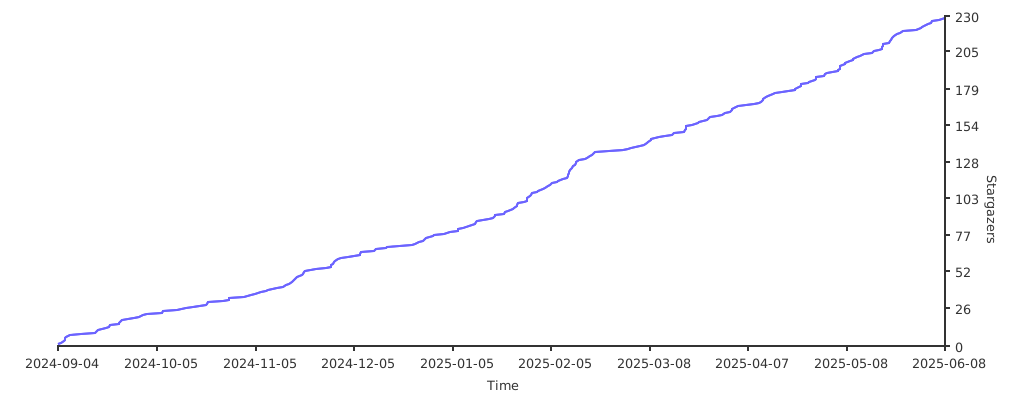
a Star on my Github repos would be nice 🌟
-
Subscribe to my Youtube Channel YouTube
-
you can also give support through coffee's or btc 😊

or

Or you can donate cryto on my btc wallet :)
1N3MeV2dsX6gQB42HXU6MF2hAix1mqjo8i

📹 Youtube videos (Click to view and watch the playlist) 📹
[](https://youtube.com/playlist?list=PLDtGd5Fw5_GjXCznR0BzCJJDIQSZJRbxx&si=iaNjLulFdsZ6AV-t)🥰🥰 💖💖 👍👍👍



](https://youtube.com/playlist?list=PLDtGd5Fw5_GjXCznR0BzCJJDIQSZJRbxx&si=iaNjLulFdsZ6AV-t)