一个简洁的 Obsidian 仪表盘插件 —— 一眼纵览你在 Obsidian 耕耘的一天。
本插件为 Aiob LifeOS 插件(未上线)的基础版,以 daily note 为路径写入 Markdown,快速记录碎碎念、待办等,不包括时间轴、洞察、时间追踪、习惯打卡、AI 助手等进阶版功能。
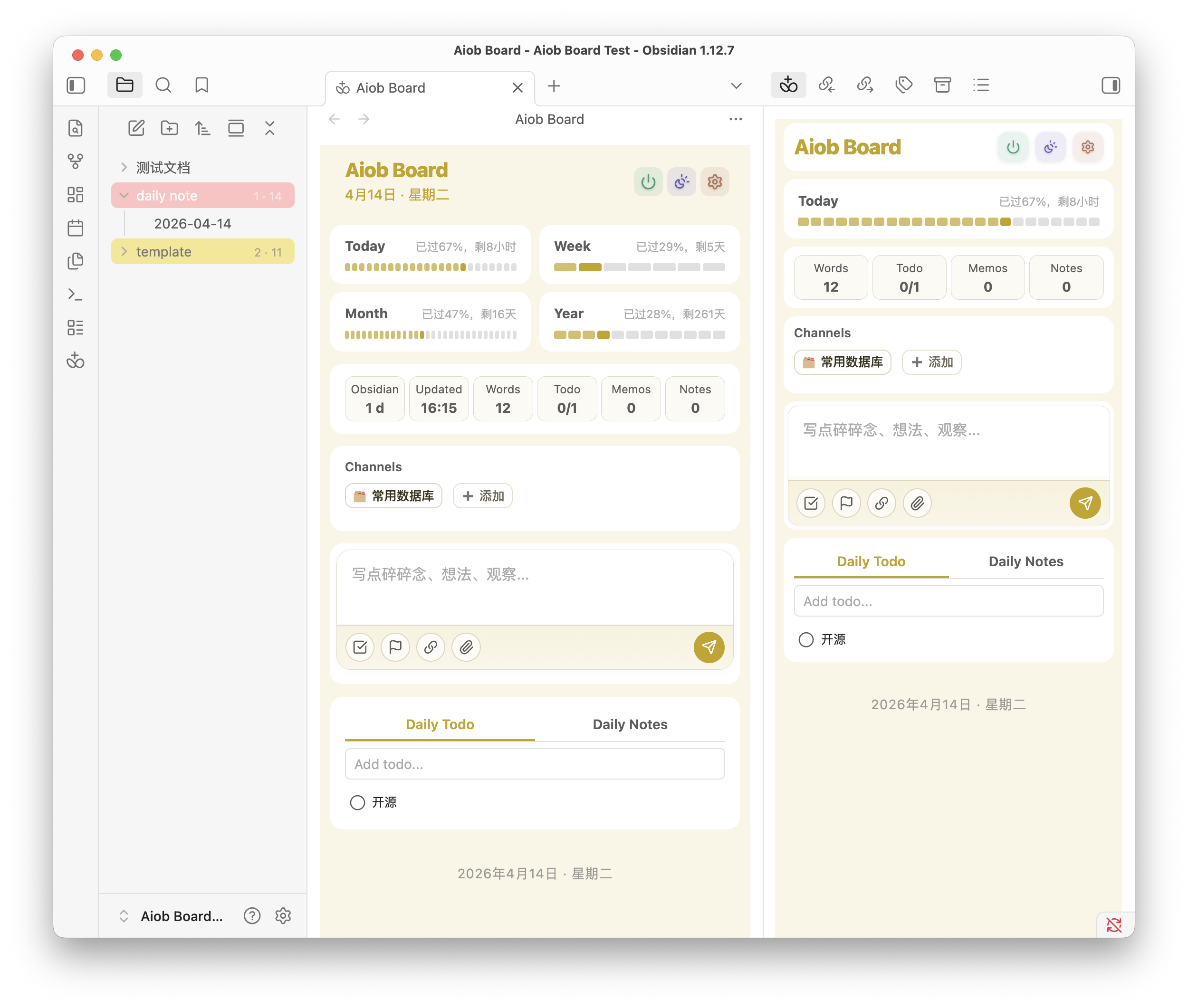
- 自定义横幅 — 拖动调整背景图位置,点击编辑显示名称
- 每日进度条 — 今日 / 本周 / 本月 / 今年,可视化进度段
- 数据概览 — 实时字数、待办进度、闪念数、今日新建文档
- 侧边栏 + 主面板 — 可作为紧凑侧边栏或全宽标签页使用
- 即时记录碎碎念,自动保存到日记并带时间戳
- 支持
[[双链]],行内预览和建议 - 拖放文件附件
- 下方显示最近 3 条闪念,完整 Markdown 渲染
- 右键菜单编辑、删除
- 今日待办 — 行内创建、编辑、完成、删除;同步库内
- [ ]任务 - 今日笔记 — 快速访问今天创建或修改的文件
- 多状态复选框 —
- [/]进行中、- [-]已取消、- [?]疑问、- [!]重要(纯 CSS)
- 日记集成 — 一键创建日记,支持模板,往年今日链接
- 新文档模板 — 新建文件自动应用 frontmatter,可配置模板和排除文件夹
- 快捷访问网格 — 将常用文件夹/文件固定为频道卡片
- 设置页完全可配 — 添加、删除、排序、自定义图标
- 文件夹/文件颜色标记 — 右键文件浏览器中的文件夹或文件,自定义背景色和文字颜色,重启后保持
- 文件夹数据统计 — 在文件夹名称旁显示文件数和总字数
- 属性彩色标签 — 自动为编辑器中多选属性标签添加背景色
- 实时字数统计 — 中文字符 + 英文单词实时计数,按文件增量追踪
- 中英文界面 — 支持中文和英文
- 移动端适配 — 完整支持 Obsidian 移动端(iOS / Android)
当前还未正式进入 Obsidian 社区插件列表,请先使用下方手动安装方式。
- 从 最新发布 下载
main.js、styles.css和manifest.json - 在库目录下创建文件夹
your-vault/.obsidian/plugins/aiob-board/ - 将三个文件放入该文件夹
- 重启 Obsidian,在 设置 > 第三方插件 中启用
- 点击侧边栏的 Aiob 图标打开面板
- 使用命令面板(
Cmd/Ctrl + P)搜索 "Aiob Board" - 在速记输入框中输入内容,按 回车 保存
- 在待办区域点击 + 添加新任务
- 右键点击闪念、待办、文件夹或文件可进行操作
打开 设置 > Aiob Board 可配置:
| 分类 | 选项 |
|---|---|
| 外观 | 界面语言(中文 / 英文)、横幅图片 |
| 常用数据库 | 添加/编辑/删除频道卡片,自定义图标和路径 |
| Memo | 目标文件、标题块、时间戳颜色 |
| Todo | 目标文件、标题块、库内任务同步、同步范围 |
| 增强功能 | 属性彩色标签、文件夹统计、文件夹颜色、多状态复选框、新文档模板 |
| 日记 | 使用 Obsidian 核心「日记」插件的设置 |
npm install       # 安装依赖
npm run dev       # 监听模式
npm run build     # 生产构建
npm test # 运行测试A clean Obsidian dashboard plugin — see a day of your work in Obsidian at a glance.
This plugin is the base edition of Aiob LifeOS (not yet released). It writes to Markdown through your daily note flow for quick memos, todos, and similar capture, and does not include advanced features such as Timeline, Insights, Time Tracking, Habit Tracker, or AI Assistant.
- Custom Banner — Drag to reposition background image, click to edit vault display name
- Daily Progress Bars — Today / This Week / This Month / This Year with visual segments
- Stats Overview — Live word count, todo progress, memo count, notes created today
- Sidebar + Main View — Works as a compact sidebar panel or a full-width tab
- Capture fleeting thoughts instantly, saved to your daily note with timestamps
- Supports
[[wikilinks]]with inline preview and suggestions - Drag-and-drop file attachments
- Recent memos displayed below with full Markdown rendering
- Edit and delete via right-click context menu
- Today's Todos — Inline create, edit, complete, delete; syncs
- [ ]tasks from vault files - Today's Notes — Quick access to files created or modified today
- Multi-status Checkboxes —
- [/]in progress,- [-]cancelled,- [?]question,- [!]important (pure CSS)
- Daily Note Integration — One-click creation with template support, "On This Day" links to past years
- New Note Templates — Auto-apply frontmatter to newly created files, with configurable template and exclude folders
- Quick Access Grid — Pin your most-used folders/files as channel cards
- Fully configurable via settings — add, remove, reorder, custom icons
- Folder & File Colorizer — Right-click any folder or file in the explorer to set custom background and text colors; persists across restarts
- Folder Stats — Display file count and total word count next to each folder name
- Frontmatter Tag Colorizer — Auto-color multi-select property pills in the editor
- Live Word Count — Real-time counting (Chinese characters + English words) with per-file delta tracking
- i18n — Chinese and English UI
- Mobile Support — Full support for Obsidian mobile (iOS / Android)
This plugin is not yet available in the Obsidian Community Plugins directory. Please use the manual installation method below for now.
- Download
main.js,styles.css, andmanifest.jsonfrom the latest release - Create a folder
your-vault/.obsidian/plugins/aiob-board/ - Place the three files in that folder
- Restart Obsidian and enable the plugin in Settings > Community Plugins
- Click the Aiob icon in the ribbon (left sidebar) to open the dashboard
- Use the command palette (
Cmd/Ctrl + P) and search "Aiob Board" - Type in the memo box and press Enter to save a quick thought
- Click + in the todo section to add a new task
- Right-click memos, todos, folders, or files for context actions
Open Settings > Aiob Board to configure:
| Section | Options |
|---|---|
| Appearance | UI language (Chinese / English), banner image |
| Channels | Add/edit/remove channel cards, custom icons and paths |
| Memo | Target file, heading, timestamp color |
| Todo | Target file, heading, vault-wide task sync, sync folder |
| Enhancements | Frontmatter colorizer, folder stats, folder colorizer, multi-status checkboxes, new note templates |
| Daily Note | Uses Obsidian's built-in Daily Note plugin settings |
npm install       # Install dependencies
npm run dev       # Watch mode
npm run build     # Production build
npm test # Run tests- Email: aioblifeos@gmail.com