
Replies: 3 comments 9 replies

-
|
I've already had a couple of people wondering this. I don't think it's possible to directly control the third fan (MSI ECs do not have any space to store a third fan profile that I know of), but maybe @glpnk knows more. @gemSquared worked around this by tweaking their default fan profiles to line up with their laptop's third fan behaviour. See their config. |
Beta Was this translation helpful? Give feedback.

-
|
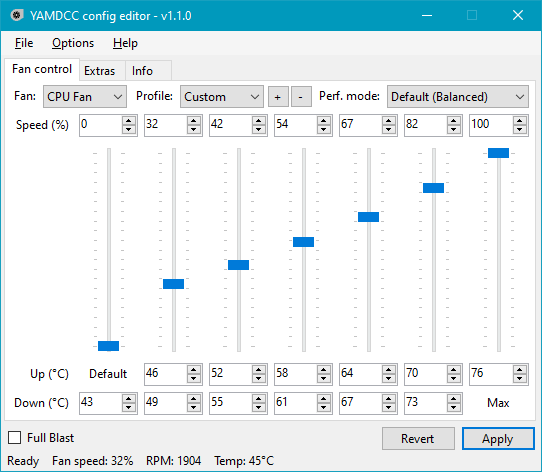
I've seen similar case somewhere, but 3rd fan seems to be triggered by second part of CPU or GPU fan curve with no fine tuning abilities. It will be nice if you can experiment with this. (UPD: I see link in @Sparronator9999's comment now) You can try zeroing trigger temp of CPU or GPU (you need to find out which probably triggers 3rd fan), assuming that first column is 0 degree triggered by default, try to set 50% RPM for test, reset % afterwards. After this start modifying temps from second column and next, without restoring temps to defaults on previous rows... Just don't touch last one. If you see that 1-3/2-3 fans spins up when you zeroed temps for half columns - this might proof my theory. But EC seems to not have separate curves for 3rd/4th fans, while can control fans. Try to figure - if this fan is controllable by main fan curves at all.
|
Beta Was this translation helpful? Give feedback.

-
I'm not quite sure if I follow, but are you referring to the "8th" fan curve point that I don't expose to the user? (another reason is because that one doesn't have a corresponding down threshold that I could find) |
Beta Was this translation helpful? Give feedback.

-
|
I've seen that older apps sometimes set whole curve to 0, except last column, so yeah. But we can also tune protections
That's normal, because it does not need it |
Beta Was this translation helpful? Give feedback.
-
|
I wonder if somehow I've ended up in test mode (because of a bad EC write), as I've had it happen before (very rarely) where no matter what I do (apart from EC reset), my fan gets stuck at 0% speed. |
Beta Was this translation helpful? Give feedback.
-
|
Only if you have EC dumps I can try to investigate. But one |
Beta Was this translation helpful? Give feedback.

-
|
How can I get an ec dump to send to you? Also from testing a bit and looking at msi center for the third fan rpm, it seems to vaugly match the cpu fan in the gs66, don't know about the GPU fan but I can test it. When. I set the cpu fan to zero, the second fan follows. |
Beta Was this translation helpful? Give feedback.
-
|
@Themazin #96 (reply in thread)
If I'm right YAMDCC have dumper
Okay, seems same, so 3rd fan (because 1st is CPU, 2nd is GPU) always follows CPU fan. Would be interesting to know if it chose faster fan (CPU/GPU) to follow, but I doubt. |
Beta Was this translation helpful? Give feedback.
-
|
YAMDCC does indeed have an EC dumper, called EDIT: |
Beta Was this translation helpful? Give feedback.
-
I will test this later and send the result in the thread.
Thanks for the help, here is the ec dump |
Beta Was this translation helpful? Give feedback.


Uh oh!
There was an error while loading. Please reload this page.
-
Hi, wondering if its possible to adjust the 3 fans on some MSI laptops individually, or if they work automatically when adjusting the gpu fan and cpu fan profiles?
Beta Was this translation helpful? Give feedback.
All reactions